F5 Big-IP Image Installation Automation
n8n · Webhook-Triggered Infrastructure Automation · Zero-Downtime Node Sequencing
01The challenge
Installing software images on F5 Big-IP devices was a manual, repetitive job taking 15 to 20 minutes of hands-on attention per run. It is exactly the kind of task where a human is being used as a state machine — checking versions, fetching files, waiting on progress bars, and repeating the whole sequence on the second node.
02The data problem
The process had real ordering constraints that make naive automation unsafe. The standby node has to be handled before the active one to avoid disrupting live traffic, the required image may or may not already be present on the device, and the installation has to be monitored to completion rather than fired and forgotten — so the workflow needed to reason about device state at each step, not just execute a fixed script.
03My approach
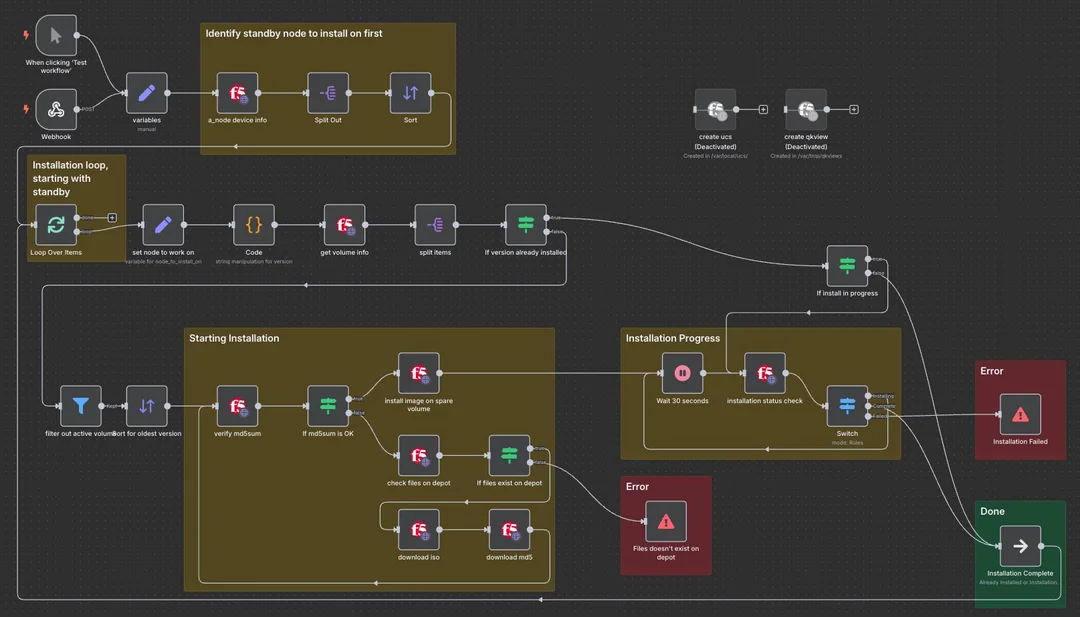
I built an n8n workflow that automates the entire sequence. It first identifies which node is on standby and starts there, then checks whether the required image version is already installed — skipping the download entirely if it is, and fetching it from the depot server if not.
From there it runs the installation and actively monitors progress until completion rather than assuming success, then repeats the same sequence on the active node once the standby is confirmed healthy.
The whole thing is triggered through a webhook that accepts hostname and target version as parameters, so the same workflow runs on demand against any device in the estate without being rewritten or duplicated per host.
04The result
A 15-to-20-minute manual procedure per device became a single parameterised webhook call. The standby-first sequencing and progress monitoring are enforced by the workflow rather than by whoever happens to be running it, which removes both the time cost and the chance of a step being done out of order.
Tools & tech stack
- n8n: full workflow orchestration including conditional logic and progress polling
- Webhook trigger: parameterised by hostname and target version for on-demand runs against any device
- F5 Big-IP integration: node role detection, version checks and installation control
- Depot server: conditional image retrieval, skipped when the version is already present
- State monitoring: installation progress polled to completion before the next node is touched
Have data that isn't telling you anything yet?
Send me what you are working with — even if it is four spreadsheets and a CRM export that don't agree with each other.